Purchase Reward
![]()
Reward purchases to build momentum for your product, then use the receipts you collect to see how customers actually shop. Feversocial's Purchase Reward module supports eGUI QR code scanning, cloud mobile barcode carrier entry, GUI Receipt entry, and receipt photo upload. Every receipt type can enter a prize draw at the end of the campaign, and eGUI Receipts and cloud carriers also support instant verification and instant rewards. Points collection is built in, too — eGUI Receipts can award points based on purchase amount.
Why run a Purchase Reward campaign?
Most brands sell through retail distribution, which really means running the business blind — the product sells, but you never find out who bought it.
Convenience stores, hypermarkets, and e-commerce platforms hold the first-party data on your customers, while brands only get channel-side sales reports: how many cases sold this month, which store needs restocking. Who bought it, what else they bought, whether they'll come back — none of that is visible. Marketing ends up reacting instead of leading, always one step behind the channel.
A Purchase Reward campaign brings real, already-completed purchases back into your hands, letting you bypass the channel and build a direct relationship with your customers. That value shows up in three ways:
Turn channel promotions into trackable traffic
A Purchase Reward campaign does more than drive short-term sales — it turns a product sitting passively on the shelf into an entry point that actively routes customers to your own channels, like LINE or your membership system. Taiwan Dairy Farm paired Purchase Reward with points collection to turn shoppers who'd otherwise see the brand only once on a PX Mart shelf into members who actively joined its LINE Official Account — every name on that list came from a real, verified purchase, not a broad-reach campaign that generates dead leads.
Turn receipts into a built-in consumer research report
Every eGUI Receipt carries a full line-item record: when it was bought, where, and what else was in the basket. That data answers questions brands used to only guess at with surveys and focus groups — for example, Feversocial once helped a fresh food brand spot a clear purchase spike from Friday through Sunday, especially in winter, with hot pot ingredients and tofu showing up again and again, pointing straight to family dinners and gatherings. That let the brand design targeted missions and co-marketing tie-ins instead of budgeting on instinct.
Turn a one-off campaign into a member database
Most receipt sweepstakes are short-term promotions — the list goes cold the moment the campaign ends. Taiwan Dairy Farm ran into the same problem: past receipt draws lifted short-term sales but didn't bring customers back. Switching to Purchase Reward plus points collection plus LINE changed that — the campaign logged over 3,600 receipts in its first two weeks and nearly 50,000 within six months. Every receipt becomes a member record you can keep marketing to, not a one-time entry that expires once the draw is over.
Why this beats the typical approach: Most receipt-campaign tools stop at verifying receipts and running a draw — once the campaign ends, the data just sits in the backend with nowhere to go. Feversocial connects Purchase Reward to your Points System, LINE friends, and CRM tagging, so a brand isn't just running a campaign — every purchase becomes the start of a member relationship. That's why many FMCG brands choose Feversocial over building their own forms or hiring an agency.
Features
01Connect to the government eGUI system
We connect directly to Taiwan's Ministry of Finance eGUI system for verification, so your campaign team never has to check receipt numbers by hand. You can verify:
- Item restrictions: define multiple sets of product keyword filters
- Amount thresholds: set a minimum total receipt amount or per-item amount
- Valid receipt dates: limit the campaign to a specific purchase window
- Channel restrictions: limit eligible receipts to specific store names, tax IDs, or addresses
- Buyer restrictions: exclude receipts issued with a business tax ID
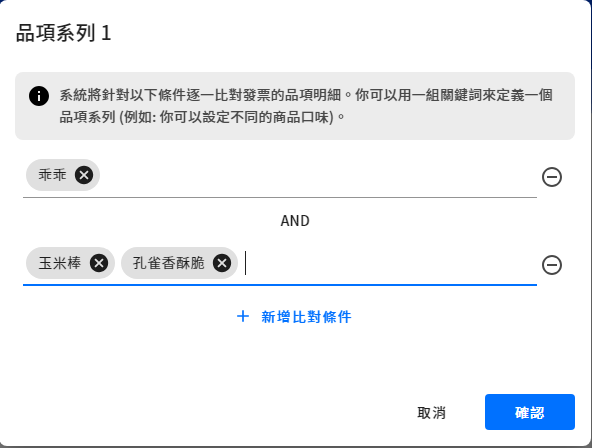
Item condition settings for receipts
Four ways to register an eGUI receipt
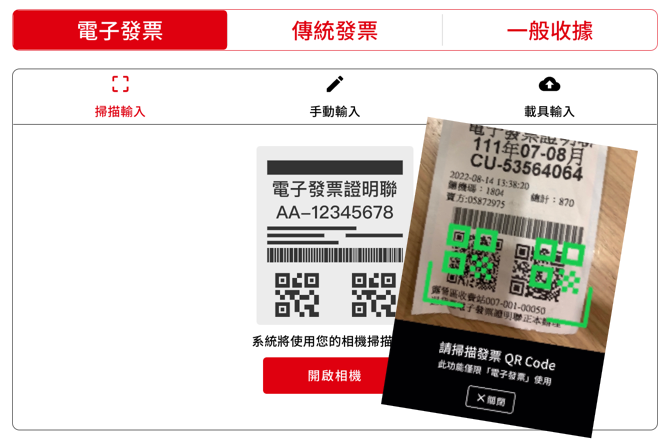
Scan the QR code on the eGUI Receipt with a phone
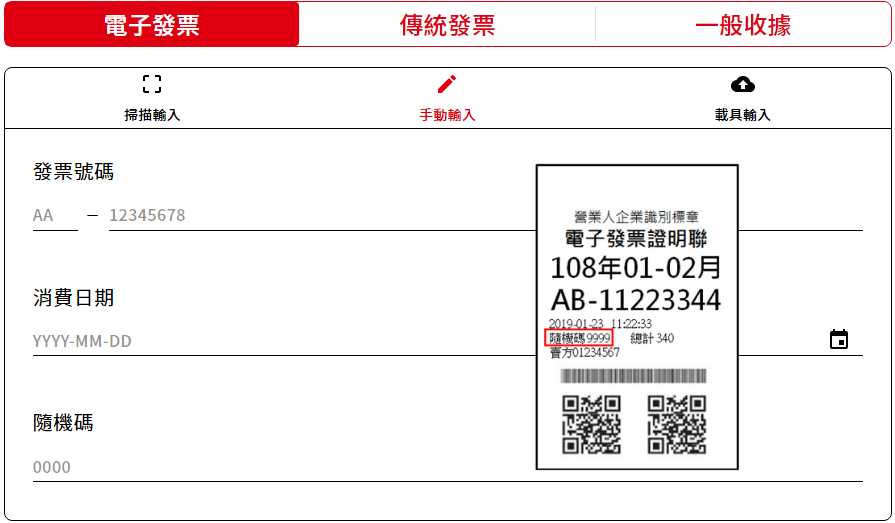
Enter the receipt number, date, and random code
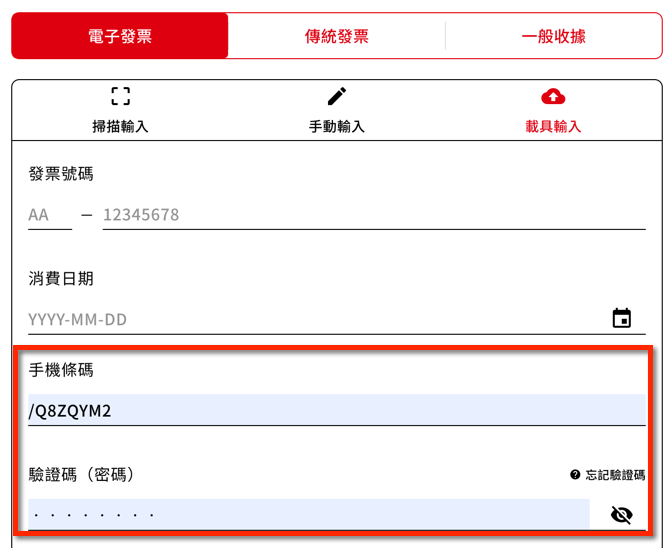
Enter the receipt number, date, and Mobile Barcode plus verification code
Upload or photograph the eGUI Receipt — the system reads the receipt number, date, and random code automatically
eGUI verification modes
Register first, verify later: Scheduled batch verification
If eGUI entry is enabled without instant verification, the system checks every receipt uploaded to the government database every 4 hours during the campaign and notifies participants once it's verified.
Instant verification: Verify the moment a receipt is entered
Participants can only enter eGUI Receipts the government database already has on file, so you can reward every entry instantly instead of waiting for a draw at the end. Pair it with Scratch Cards, the Lucky Wheel, or Poke a Prize for instant rewards — for example, entering a receipt instantly triggers a Scratch Card.
Pre-approved entry: Play the draw right after submitting
Choose this mode to let participants play the draw right after entering a receipt, without waiting on verification. It pairs well with the Review Period feature — you approve receipts afterward and only release prizes once eligibility is confirmed.
Good to know: Merchants are required to upload receipts to the government eGUI system within 48 hours of issuing them, so a receipt won't be found until it's uploaded. Check with each retail channel on how often they batch-upload receipts.
02Flexible prize rules for creative reward campaigns
Feversocial's built-in random draw engine picks winners for every prize automatically — no separate drawing tool required. We also offer a range of reward mechanics, so you can pair Purchase Reward with options like instant-win-on-verification, or instant-play games such as the Lucky Wheel and Scratch Cards, and hand out e-coupons or LINE Points to make your receipt campaign more fun and engaging.
Conditional prize award: Different prizes for different purchases
Turn on Conditional Prize Award and set item keywords so different receipt items automatically get matched to different rewards — raising redemption appeal and prize usage, driving repeat purchases and brand loyalty, and building an experience that actually reflects customer behavior.
- Award different point values for different product lines or pack sizes, so one campaign can reward multiple purchase behaviors at once
- Give different bundled gifts to customers who buy different skincare items, so rewards match what customers actually want

03Effortless receipt points collection
Pair Purchase Reward with Feversocial's Points System and the newer Points Redemption module to replace an end-of-campaign draw with ongoing points collection — turning receipt registration into a real driver of brand loyalty, not just a short-term sales spike.
Many shoppers skip receipt sweepstakes because they assume they'll never win. Swap a single grand prize for a range of smaller rewards that customers redeem with points instead, so every purchase pays off and gives them something to work toward. You set your own exchange rate between spend and points (for example, 1 point per NT$10 spent).
Explore the Points Center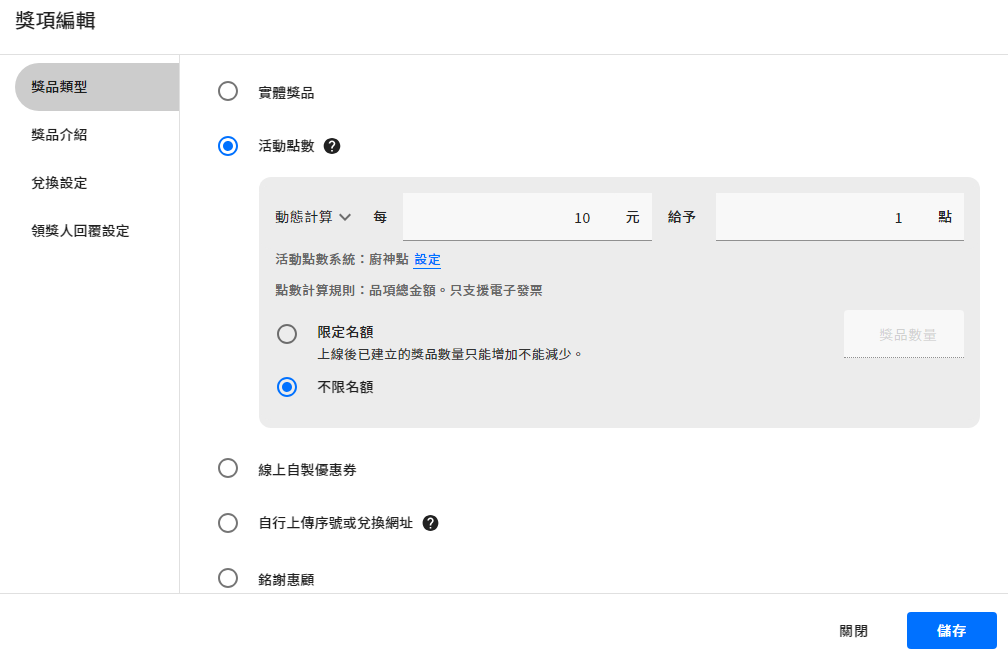
04Powerful review tools for faster draws
GUI Receipt review: For traditional paper receipts or general receipts, the admin dashboard gives you a fast review flow — view uploaded receipt photos directly and approve them manually. You can even review while a draw is running.
The “review period” feature automatically flags returned receipts
eGUI Receipts are verified automatically by the system and marked as approved right away. When Review Period is turned on, the system re-verifies the receipt once the review window ends, and participants can't claim their prize until that second check passes — so a returned receipt never qualifies for a reward.
For example: set Review Period to 7 days, and the system re-verifies the receipt after those 7 days. Customers can claim their reward as soon as they register a receipt, but can't use the prize until the 7-day review period passes — keeping returned receipts from undermining the campaign's fairness.

05Add a quick survey to learn shopper behavior
Don't waste the chance to learn about your customers. Turn on a sign-up form as a mini survey during the Purchase Reward flow to collect contact details along with richer profile data and customer feedback.
For example: purchase frequency over the past year, reasons for buying, and feedback on the product
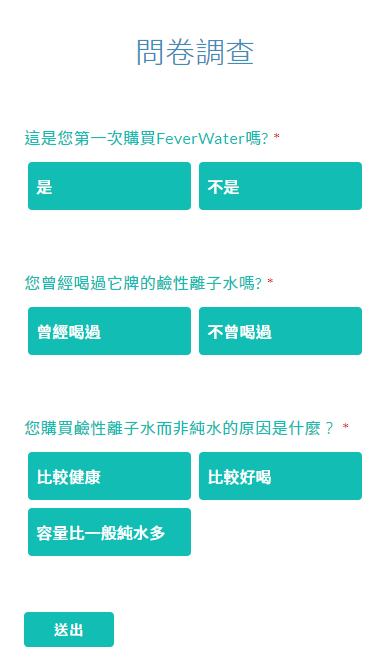
A survey can be added to the Purchase Reward flow
06Download full eGUI receipt details
Want to know what else your customers bought along with your product? For eGUI Receipts, you can download the full line-item details after the campaign ends for deeper purchase-behavior analysis — the system pulls in every item from that receipt.
US retailer Walmart famously mined years of transaction data and found that beer and diapers were often bought together on weekend nights — a classic case study on the value of big data. Brands distributed across multiple retail channels can use a Purchase Reward campaign to get that same first-party transaction data, analyzing receipt details for channel, items purchased, and spend.
*Important: If you plan to use receipt data for retargeting participants or de-identified behavior analysis, be sure to disclose your data collection purpose in the campaign rules to comply with Taiwan's Personal Data Protection Act.
See How to Write Campaign Rules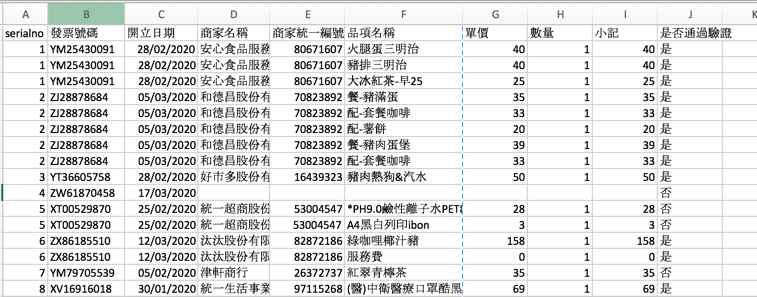
07Receipt tagging for precise preference insights
Beyond receipt details, brands can automatically tag customers based on the items in the receipts they register, pinpointing purchase preferences with precision. This also helps brands understand shopping behavior in depth — tag data syncs in real time to your CRM and integrates with your chatbot and CDP, building a fuller customer dataset, enriching customer profiles, and boosting overall marketing performance.

Purchase Reward campaign FAQ
Does a brand need government approval to run its own Purchase Reward sweepstakes?+
What if our marketing team has no engineering resources to manually verify every receipt number?+
If a winning customer returns the product after claiming a prize, do we take the prize back?+
If our product sells through multiple channels with different receipt formats, will some customers be locked out of the campaign?+
We've run receipt sweepstakes with low participation — is it because customers assume they'll never win?+
How do we make sure Purchase Reward rewards line up with the products we actually want to promote?+
Our product sells through multiple channels, but we have no idea who's actually buying it — what can we do?+
We ran a receipt campaign and no one participated — what went wrong?+
Demo
Further reading
Purchase Reward case studies
Ready to build your Purchase Reward campaign?
No code required — build it yourself and experience Purchase Reward firsthand.
