Mission Reward (Staff Input)
![Multi-Task Module]()

Design in-store "purchase" and meaningful "non-purchase" missions that drive more real-time engagement with your customers
Supports social login and member login integration. Staff use a tablet or phone to scan and verify each mission, then hand out rewards on the spot. Pair it with a points system to build loyalty and bring customers back.
Strengthen every in-store touchpoint and create offline experiences customers actually feel
Turn any physical space into your brand's strongest engagement hub with Mission Reward (Staff Input)
Store staff reward customers for completing "purchase" and "non-purchase" missions, sharpening the in-store experience and brand affinity.
Customers just show their unique campaign QR code, staff scan it, and the reward is handed out — keeping the barrier to entry as low as possible.
Pair it with Feversocial's points system and redemption module so customers keep completing missions, earning rewards, and building a return habit.
Every completed mission is logged, with support for Auto-Tagging, building a richer, reusable customer dataset — a long-term asset for your brand.
When should you use Mission Reward (Staff Input)?
VIP Service Experience x Low Setup Effort x High-Traffic Venues

A dedicated staff member handles check-in, keeping the experience feeling premium
Ideal for: beauty counters, medical aesthetics clinics, luxury VIP events, and more

For less digitally savvy customers, staff hand out rewards directly — no phone steps required
Ideal for: pharmacies, senior-focused retail, events for older customers, and more

Staff verify the mission and hand out the reward in one step, cutting wait times and keeping the line moving
Ideal for: pop-up stores, department store activations, trade show floors, and more
Feature 1: Staff become brand engagement champions, with a simple, low-barrier flow
Customers show their unique campaign QR code, and staff confirm the mission and scan to hand out the reward with a tablet or phone. Staff lead the interaction instead of customers fumbling with an app, turning store associates from passive service reps into active brand ambassadors and creating more moments to connect with customers and share your brand story.
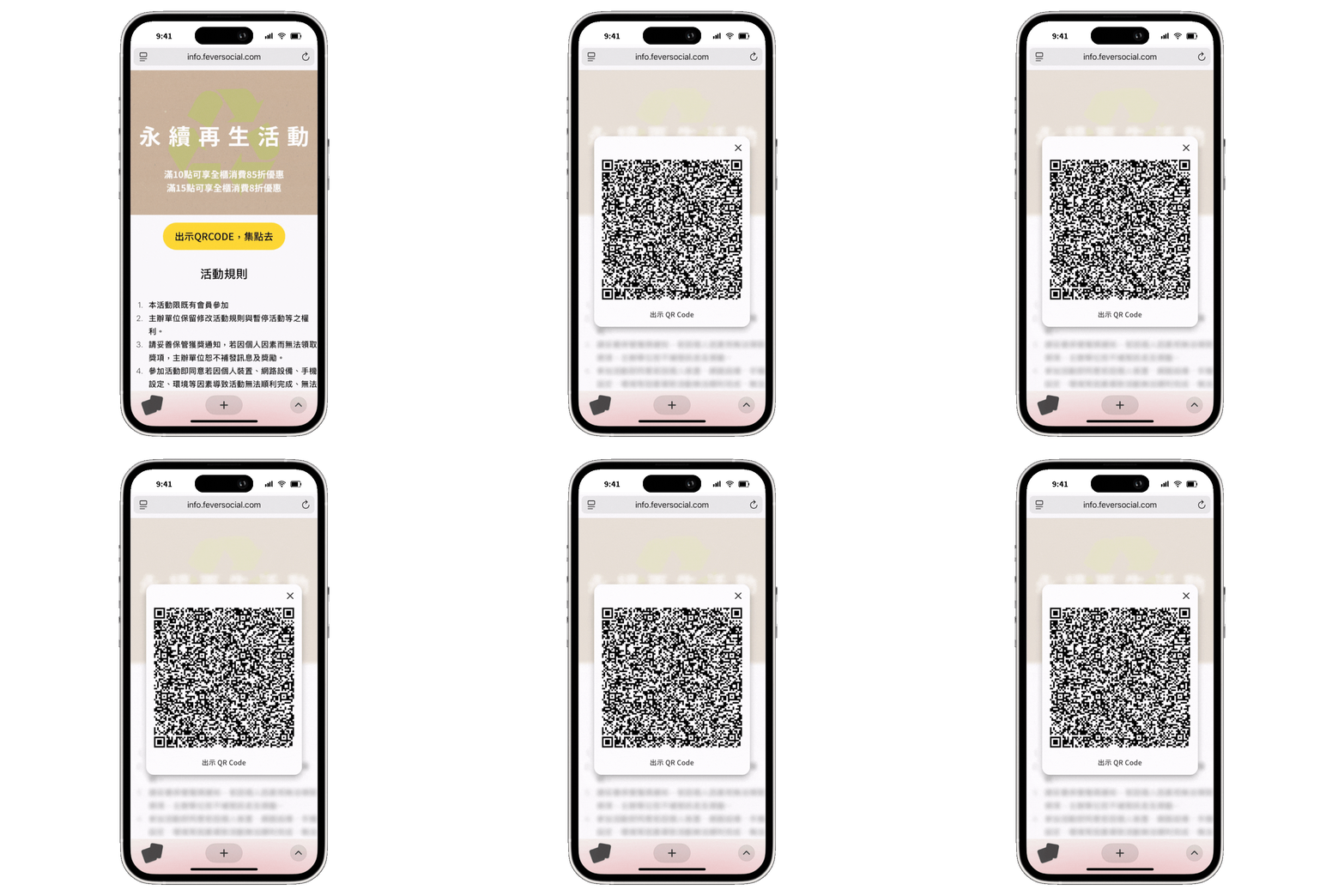
Customers show their unique campaign QR Code
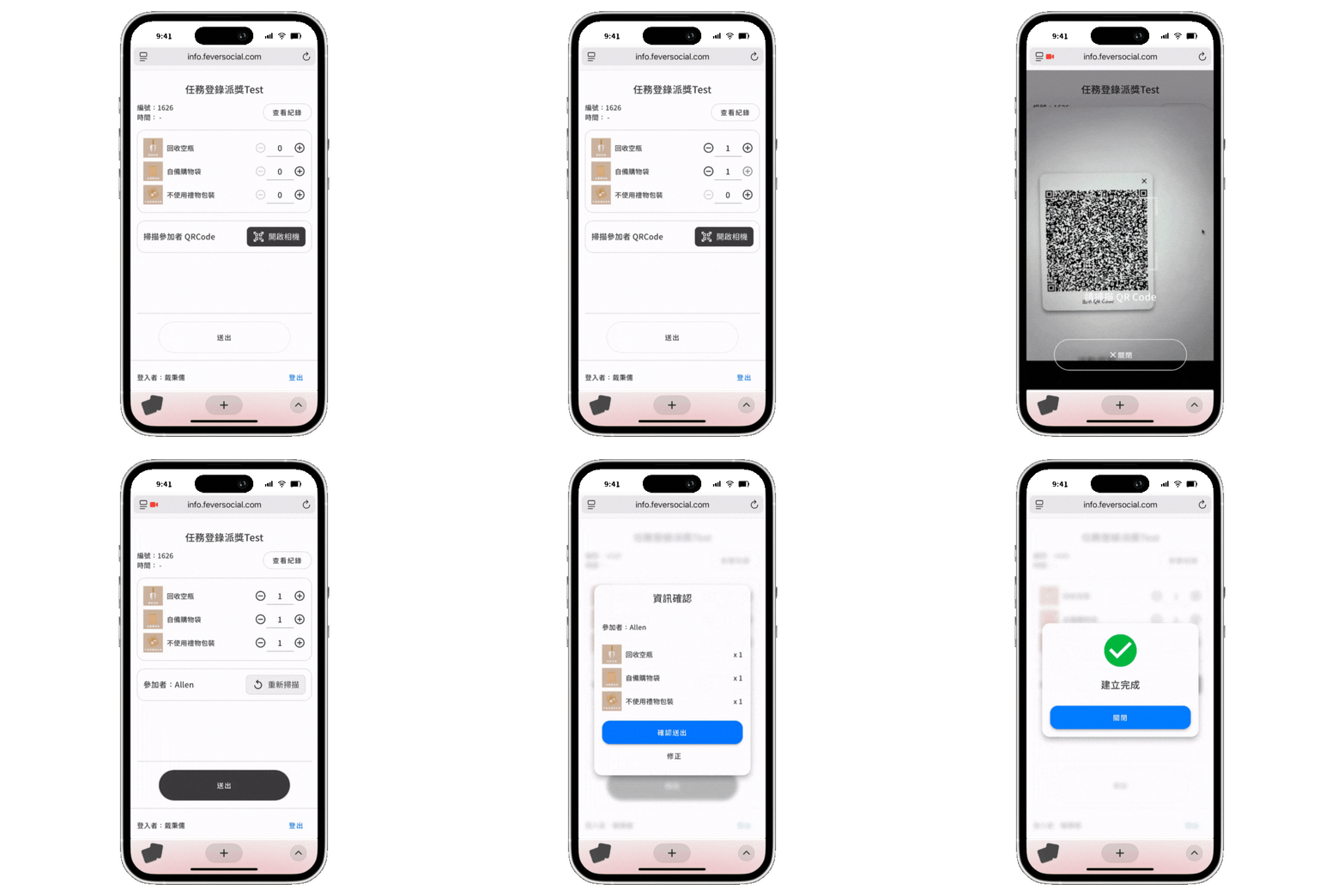
Staff log the completed mission and scan to hand out the reward
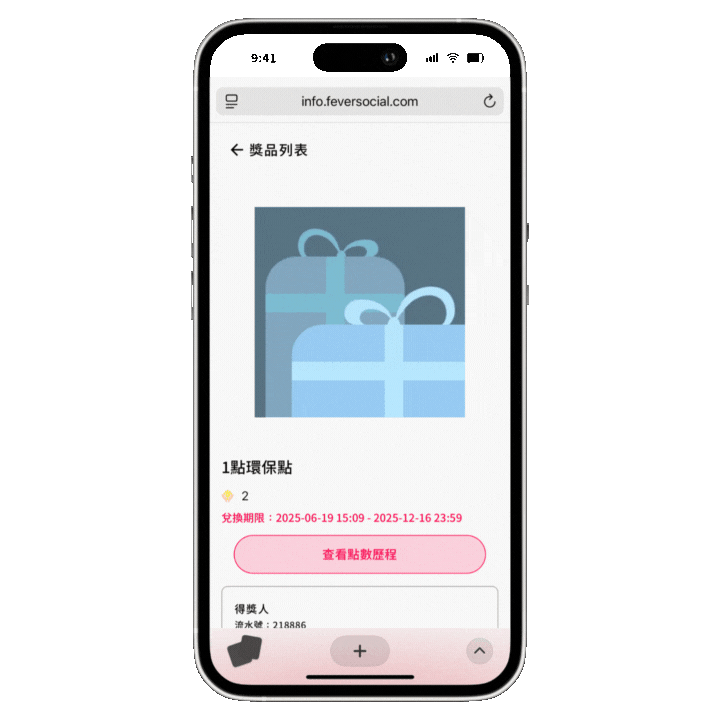
Mission rewards or points post automatically to the customer's account
*Brands turn this on directly in Feversocial's On-site Promo Assistant by selecting the Mission Reward tool. If your brand has multiple stores, branches, or counters, we also support bulk-creating store and staff accounts so you can assign management access by location and run operations more efficiently.
> Learn more about On-site Promo Assistant
Feature 2: Flexibly set different mission conditions, verify them all at once
Turn any offline behavior your brand wants customers to complete into a mission. It's not limited to "purchase actions" — you can freely set up other "in-store interaction" missions too, giving your brand's creativity room to grow.
- Purchase actions, such as: hitting a spending threshold on one receipt, buying a specific item, or buying a promotional bundle
- In-store interaction actions, including any positive behavior your brand wants to encourage — such as returning empty bottles, recycling old devices, or joining an in-person charity event

Example: A department store beauty counter runs a summer campaign with a mix of missions — purchase actions (spending threshold, buying a specific product) and in-store interactions (color matching, in-depth skin analysis)
Feature 3: Match different missions to different rewards, for more precise targeting
Turn on "Conditional Prize Award" to match each mission to its own reward. The system hands out the right reward the moment a customer completes a mission, so rewards stay precise and relevant to what each customer actually wants.
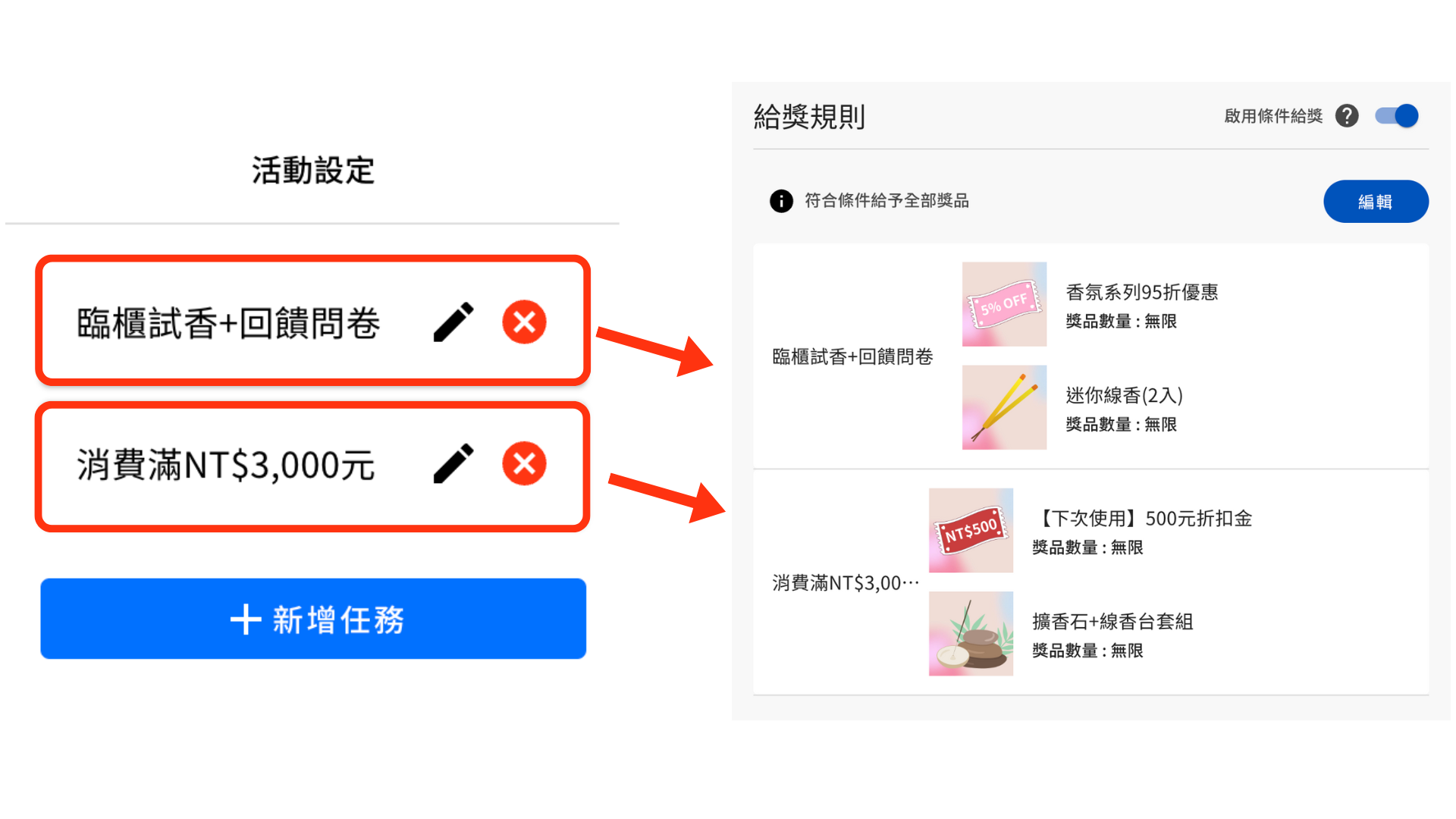
Example: At a fragrance counter, customers who try a scent in person and fill out a feedback survey get a 5%-off coupon plus a mini incense stick; customers who spend NT$3,000 or more get a NT$500 discount voucher plus a diffuser stone and incense stand set
Feature 4: Combine points earning and redemption to boost customer retention
Beyond handing out a physical prize or coupon on the spot, you can pair it with Feversocial's points system and redemption module to keep customers coming back to earn points, redeem rewards, or enter a lucky draw, extending the engagement cycle and boosting customer retention.
Set a different point value per mission — for example, award 1 point for every 1 mission completed

Staff enter how many times each mission was completed, and the system auto-calculates the point total
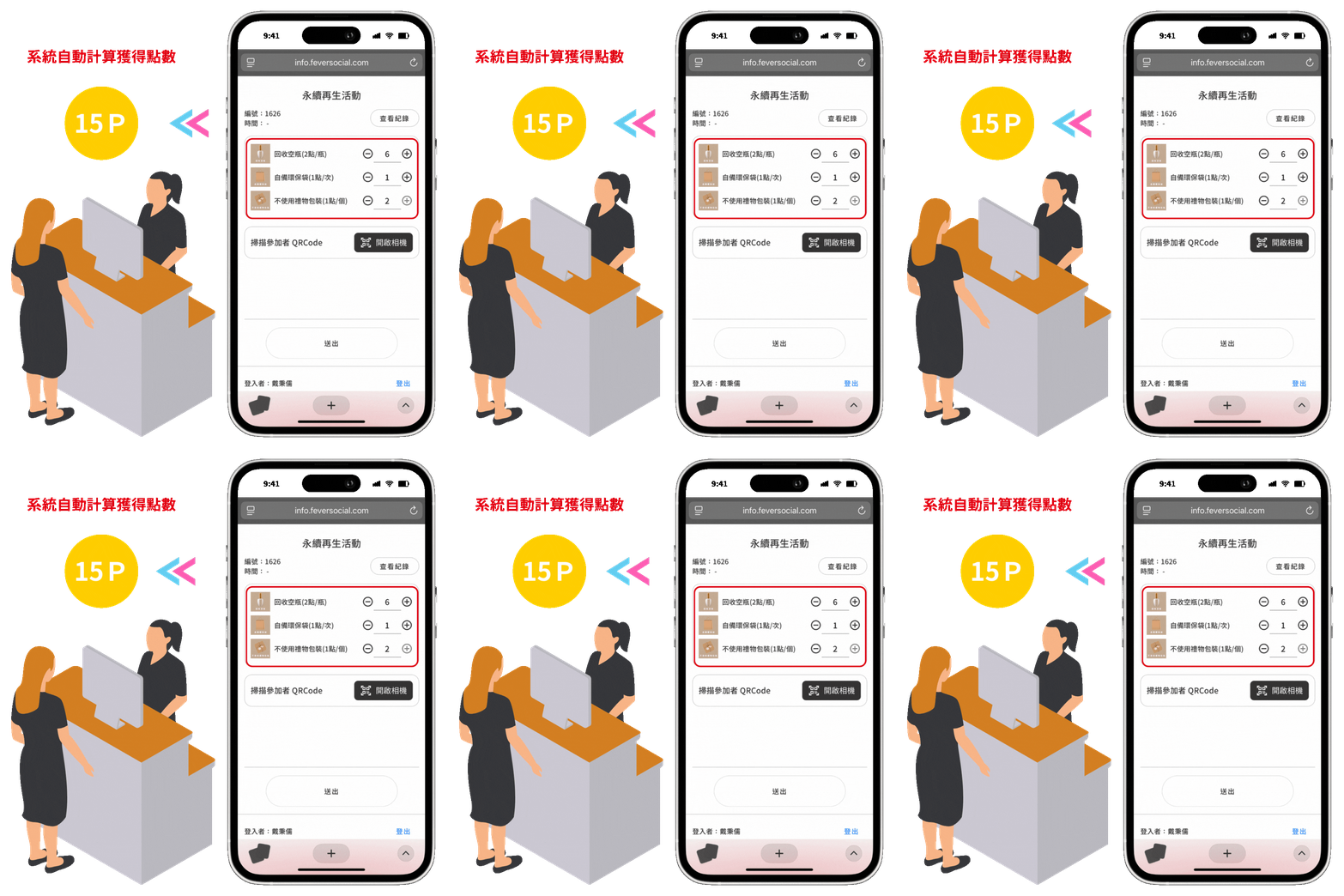
Example: A brand runs a sustainability campaign — Return Empty Bottles earns 2 points, Bring Your Own Bag and Skip Gift Wrapping each earn 1 point. A customer returns 6 empty bottles, brings a reusable bag, and skips gift wrapping on two gift sets, earning 2 pts x 6 bottles + 1 pt x 1 + 1 pt x 2 = 15 points total
Customers can see their full points history for every campaign in the points center

Customers redeem the points they've earned for rewards they actually want

Feature 5: Use auto-tagging on missions to build long-term brand assets
Brands can automatically tag each mission, giving you a complete record of every offline interaction, and segment audiences by mission tag for future campaigns.
Tag data also syncs in real time to your CRM (Customer Relationship Management) system and integrates with your chatbot and CDP (Customer Data Platform), helping you build a long-term customer asset.

Example: Customers who complete the Return Empty Bottles and Bring Your Own Bag missions are automatically tagged with matching labels
3 use cases in action
Purchase Rewards x Brand Engagement x Environmental Giving
Purchase Reward missions: Set reward tiers by spending threshold to lift average order value
A department store counter runs a seasonal spending challenge — customers hit different spending thresholds to earn different rewards

After hitting the threshold, the customer shows a QR Code for staff to scan

Staff hand out the matching reward based on the customer's spending tier

In-store points challenge: Reward good habits and repeat visits without disrupting daily service
In-store service or venue designs "purchase" and "on-site interaction" point missions, encouraging the positive actions your brand wants to promote

Staff log every mission a customer completes with On-site Promo Assistant

Customers show their QR Code to earn points, then redeem a sample they like once they hit the threshold

Sustainability points missions: Reward charitable action, not just purchases, to deepen ESG affinity
Brands design an eco points program that encourages "purchase" and "environmental giving" actions, putting real support behind sustainability

After taking part in a sustainability action, customers show a QR Code for staff to scan

Staff open On-site Promo Assistant to log the completed mission and award points, which customers redeem for a coupon

Mission Reward (Staff Input) case studies
Related solutions
Ready to make your physical space more engaging?
