Commercial personality quiz planning—
turn quiz results into a stronger bond with your brand
Feversocial's AI Personality quiz builder gives your brand a conversion engine. As customers move through the quiz, they tell you their preferences, motivations, and needs—then the results page connects them straight to your products.
Are your quiz results connected to your brand?
Personality quizzes are one of the highest-reach interactive formats on social media—entries and shares are usually strong. But what actually determines whether a quiz is worth running comes down to one question—is the result your customer gets connected to your brand and products?
If the result is just a personality label, customers read it and move on—the campaign leaves you with one-time traffic, not an asset you can build on. Only when there's a real connection can you ask the questions that matter: which products customers saw along the way, what usable information they left behind, and how you can keep talking to them afterward.
That connection gets built at the planning stage—not patched in after the quiz goes live.
Four bottlenecks marketing teams hit when planning a quiz
It's hard to land on a theme that's both on-brand and share-worthy.
Question logic, copywriting, visuals, and technical integration—every step eats into your team's hours.
The quiz result is just a personality label, unrelated to your brand positioning or product line.
Customers finish the quiz without leaving behind usable data, so there's nothing to follow up on or measure.
A planning tool built on thousands of brand quizzes
AI Personality quiz builder is a planning module under Fever AI Agent (formerly called the “AI quiz generator”). Tell it your brand information, marketing goals, and product range through a simple conversation, and it produces a complete quiz script—covering the quiz theme, questions, result categories, and matching products.
Output quality comes from Feversocial's hands-on experience across thousands of brand quizzes and the marketing insight behind them. Even with just a brand name and a marketing goal, it produces on-brand content you can use for audience segmentation and purchase guidance.
A commercial quiz is one built to drive conversion
Result categories map to your product line
If the result is just a personality description, customers read it and they're done. AI Personality quiz builder designs result categories that map to your product line from the start, so customers see specific products right on the results page—the baseline requirement for a quiz to drive conversion.
Built around your marketing goal
Seasonal promotion, new product launch, product recommendation—each goal calls for a different quiz structure. The plan converges on the goal you set, so you don't end up with a quiz that's fun but can't support conversion.
CAMA CAFE: Turning an in-store moment into quiz material
#Customer Case Study
CAMA CAFE's marketing team noticed a scene that plays out at the counter every day: customers staring at the menu, unsure what to order. The team turned that moment of indecision into quiz material—helping customers find the right drink for the moment, while the results introduce different menu items along the way.
Building the quiz around a real customer moment is the most effective way to connect a commercial quiz to your products.
Let the AI quiz generator produce your quiz script
STEP 1: Enter your brand information

STEP 2: Choose your marketing goal

STEP 3: Provide your product range

STEP 4: Choose your quiz direction
STEP 5: AI drafts it in one click!
Real-world results: Less planning time, sharper content
#CAMA CAFE Marketing Team Feedback
As marketers wearing five hats, we always have plenty of ideas we want to run with, but time and headcount mean creative ideas often die in our heads. Right before Dragon Boat Festival, Feversocial's support team encouraged us to try the AI quiz generator—I was skeptical at first. The most painful part of building a quiz used to be designing the questions and answers, then working all the way through to personality assignment; we'd even sketch out flowcharts that ended up looking as complicated as a maze.
This time, I just answered a few key questions—including the audience we wanted to target (office workers, for this campaign)—and the plan was ready. The content quality was strong enough that we launched it almost exactly as generated, just adding visuals. The whole experience was great, and we're looking forward to Feversocial building more tools that make marketing teams more efficient.
— Alice Chang (張庭瑜), Senior Specialist, CAMA CAFE Marketing Department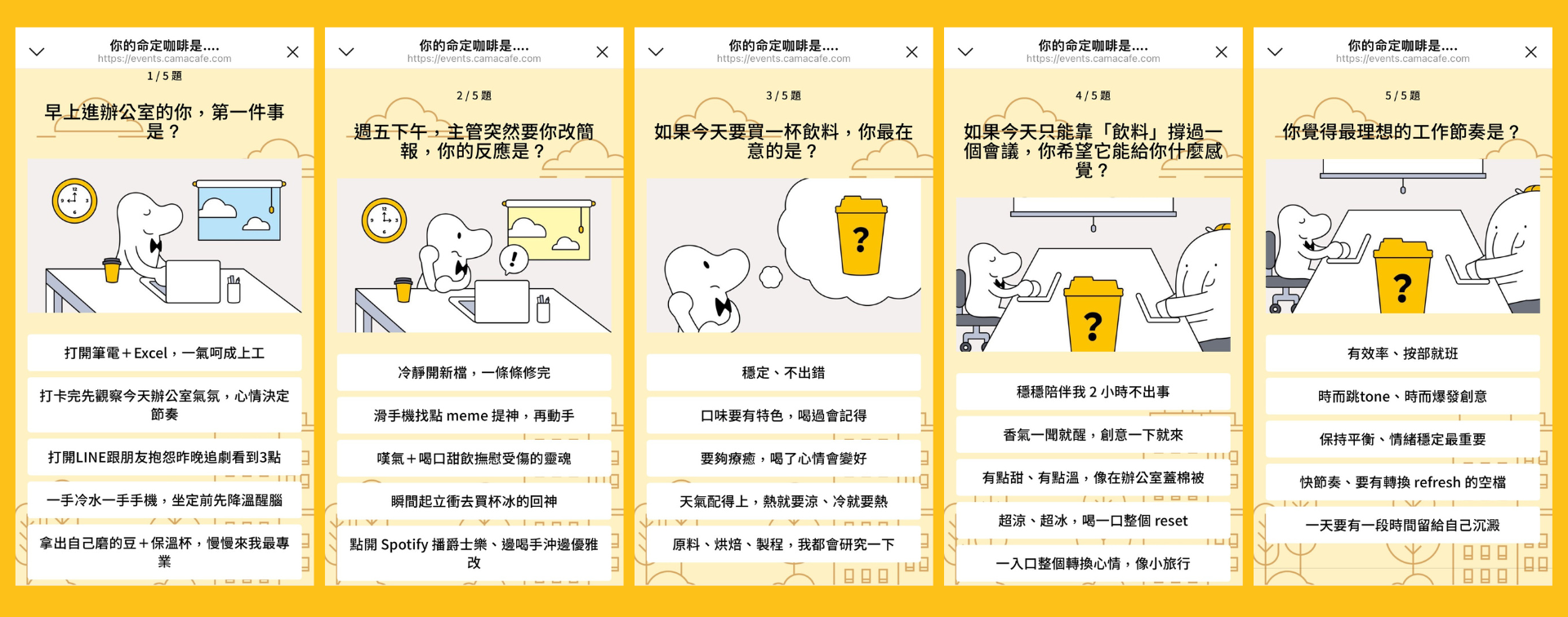
After the quiz went live on social media, it also drew enthusiastic sharing from customers—proof that the content resonated with the target audience and generated real social reach. Users were happy to share their “destined coffee” result, which gave the brand a real boost in engagement.
>> Try the CAMA CAFE quiz <<
After the plan is ready, build your campaign in the quiz module
AI Personality quiz builder is built into the Personality Quiz campaign editor. Apply the generated questions and results with one click and they write straight into your campaign fields—no separate request or manual copying needed. Pair the quiz with a giveaway, coupons, or product recommendations to lift participation and conversion, or auto-tag customers by their result for retargeting later.
Build your first commercial quiz
Log in to the Feversocial dashboard and create a Personality Quiz campaign to unlock AI Personality quiz builder in the editor. Enter your brand and marketing goal to generate a plan, apply it in one click, add visuals, and you're ready to launch.
