Order Reward
![]()

Connects to your e-commerce order system — no engineering required
Reward loyal customers on every order and turn purchases into repeat business. Members register a purchase, the system checks it against your campaign rules, and they instantly unlock a prize-draw entry or an instant-win game.
- This module works with your own branded e-commerce store or physical retail locations. It requires an order verification integration — reach out and we'll walk you through the setup for your systems.
- If your store runs on the CYBERBIZ or SHOPLINE platform, add the e-commerce plan to unlock this module and launch an Order Reward campaign fast.
The benefits of an Order Reward draw
Reward customers while controlling your marketing budget for a better ROI
The Order Reward module lets brands deliver a campaign highlight while staying flexible with marketing spend.
Set eligibility requirements
Only orders that meet your campaign rules — and members who actively register them — count toward the bonus reward pool, keeping unnecessary marketing costs down.

Flexible prize count and value
Brands can set the number, value, and distribution of prizes to match their budget. Send low-cost discount vouchers to keep margins tight and drive a second purchase, or offer a high-value grand prize to create buzz and pull in more participants.

Features
1. A simple registration flow that keeps members moving
After logging in, the system checks the member's orders against your campaign rules and registers a qualifying order automatically. If more than one order qualifies, the member picks which one to register. When you allow multiple entries, members can also choose “Enter Again” — any order already registered is grayed out.
Automatic registration for a single qualifying order

Manual selection when multiple orders qualify

2. Flexible order conditions for precise rewards
Set different order verification rules based on the products you want to promote or the goals of each campaign window.
Item VerificationCampaign item keywords
The system flags order items that match your keywords, encouraging customers to buy specific products — ideal for new launches or bundle promotions.

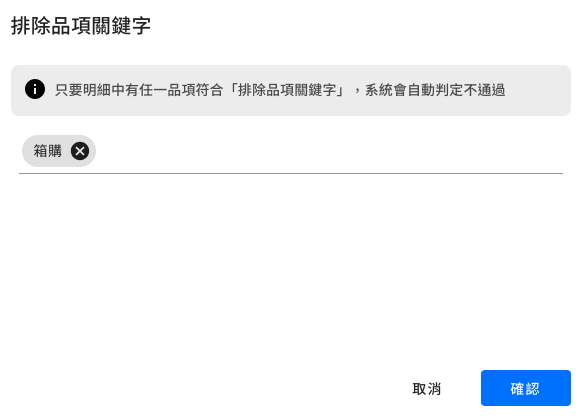
Excluded item keywords
If an order contains an excluded item keyword, it automatically fails verification.
Total order amount
The system checks the total value of the order. Combine it with campaign item keywords to reward customers who buy a specific product and reach a spending threshold — driving up average order value and sales of higher-priced items.
Item subtotal
The system checks only the subtotal of items that match your campaign item keywords.

Purchase date window
The system checks the order date to drive purchases during a specific campaign window. You can also require registration within a set number of days after purchase, adding urgency and keeping momentum high.

3. Multiple reward types that make every campaign stand out
Design instant and delayed rewards to match your marketing strategy. Mix and match freely — pair a prize game with a grand prize draw at the end of the campaign, so members get an immediate reward and still look forward to the final results.
Instant rewards | instant win or prize game
- Instant Win: A reward every member gets for a successful registration — perfect for a small, low-risk prize like a NT$10 voucher or a 5% discount coupon. It thanks customers right away and sets up their next purchase.
- Prize Game: After a successful registration, members play a prize game — spin the Lucky Wheel, try a Scratch Card, or use Pick a Prize — for a chance to win through a fun, interactive moment. Rewards can include free-shipping vouchers or discount codes, adding engagement while encouraging repeat purchases.
Connect it to your e-commerce coupon or loyalty points system so members can view and redeem rewards anytime.
* CYBERBIZ and SHOPLINE stores already support this integration — contact us to learn more.

Manual draw | built-in random draw tool
Run a grand prize draw across all registered orders during or after the campaign — ideal for distributing big-ticket prizes.

Order Reward campaign use cases
Use case 1 — pair with a seasonal sale for a “spend and win” promotion
Scenario: During peak shopping periods like 11/11, 12/12, or your brand anniversary sale, let any purchase over a set amount qualify for the order prize draw — driving up average order value during the campaign window.
Use case 2 — pair a product launch with a prize draw to drive early adoption
Scenario: During a launch window, buying a specific product line or model earns rewards like e-commerce coupons or vouchers. Pair it with the Multi Challenge module to reward members for extra actions, like sharing an unboxing photo or completing a survey.
Use case 3 — ease inventory pressure by pairing a prize draw with near-expiry sales
Scenario: To clear out specific inventory, let members enter a draw for a bestseller bundle when they buy near-expiry products — limiting potential margin loss while introducing members to other items in your catalog.

Like this template?
Click the copy button below to send it straight to your own Feversocial dashboard for editing.


Choose Feversocial and launch your member reward program today
