How to set up CNAME subdomain mapping
Connect the pages Feversocial publishes for you to a custom subdomain on your own website. Once it’s set up, all that page traffic counts as your site’s traffic. Here’s how it works and how to set it up.
How to point Feversocial at a custom subdomain on your website
Did you know Feversocial’s publishing system can connect your published pages to your own website? Once it’s set up, all that page traffic counts as your site’s traffic.
First, check whether your plan includes custom subdomain mapping.
If your plan doesn’t include it yet, get in touch and we’ll add it → Contact Us
If it does, first find whoever manages DNS for your website. Once you’ve tracked them down, treat them to a bubble tea, then have them use the information below to complete the setup for you.
Original URL
https://feversocial.com/[your event page ID]
 Custom Subdomain (CNAME) Setup
New URL
https://[events].yourdomain.com/[event page ID]
Setup steps
Choose your subdomain name
Let’s say your website is: www.mysite.com.tw
You can add a subdomain such as events.mysite.com.tw
If events is already taken, or you’d rather use something else, that works too (for example, news.mysite.com.tw).
Update your DNS: point your subdomain’s CNAME to Feversocial
Add a new record in your website’s DNS settings
- Record Type: choose CNAME
- Hostname: set it to your subdomain name, e.g. events
- Value (Target Hostname): set it to Feversocial’s domain: proxy.fevercdn.com
Let Feversocial know your mapping is set up, then wait for DNS to propagate
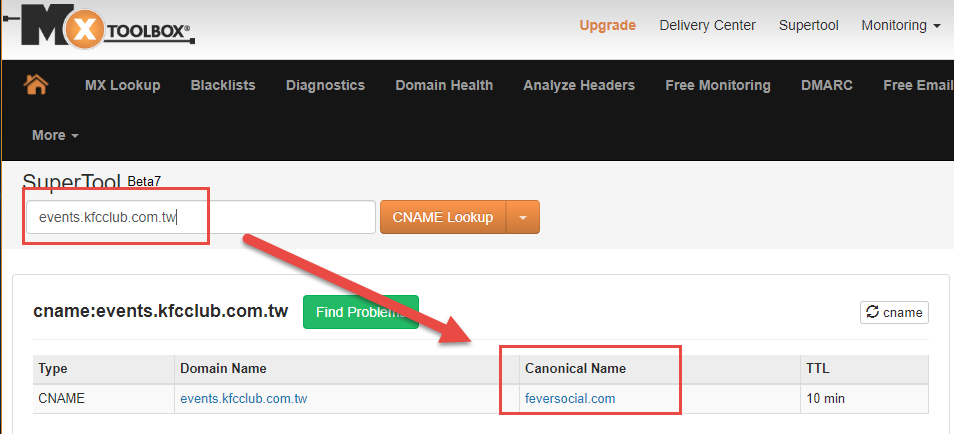
To confirm it worked, enter your subdomain into this lookup tool: https://mxtoolbox.com/CNAMELookup.aspx
Example reference: (setup steps vary by hosting/DNS provider — check with your provider for exact instructions)


What is a CNAME?
A CNAME record — also called an alias record or canonical record — is a DNS entry that points one domain to another, letting you set up multiple aliases for your website.
For example: events.mysite.com, promo.mysite.com, and so on.
Benefits of setting up a CNAME
With a CNAME record, you can set up multiple aliases for your website at once, or point a subdomain to another platform (Feversocial, for example) by managing that subdomain through CNAME.
Why connect your domain?
More trust from your customers
Visitors instantly recognize the content as official, and the URL they share is your own subdomain — not a third-party platform’s domain. No more awkwardness the next time you share a link on Facebook.
A real boost for traffic and SEO
If you want a stronger SEO score, remember: it’s a team effort now, and your subdomain is your best ally. Once it’s connected, don’t forget to add a link to the subdomain page somewhere on your main site — that’s how search crawlers learn the two are related.
Better tracking for your ad campaigns
Feversocial unlocks an extra GTM field for customers who’ve set up subdomain mapping.
