Promo tagging
Expand your customer profile data. Automatically tag customers by their promo results, then sync those tags to your CRM, chatbot, e-commerce membership system, or CDP for retargeting.
What is Feversocial’s promo tagging?
Running a marketing promo is a great chance to engage with your customers and learn more about them. But how do you put the data you collect to work efficiently for retargeting?
Feversocial’s Promo Tagging feature automatically classifies participants by their engagement results, so you can use these tags to expand your customer database.
*Promo Tagging is available on Enterprise plans
Promo tags expand your customers’ "soft" data

Image credit: Tealium
What makes Feversocial’s promo tagging stand out?
Set a tag duration
The system calculates and stores an expiration date from each tag’s duration and the date it was applied.

Assign multiple tag types per promo
Set up multiple tags for each tag type.
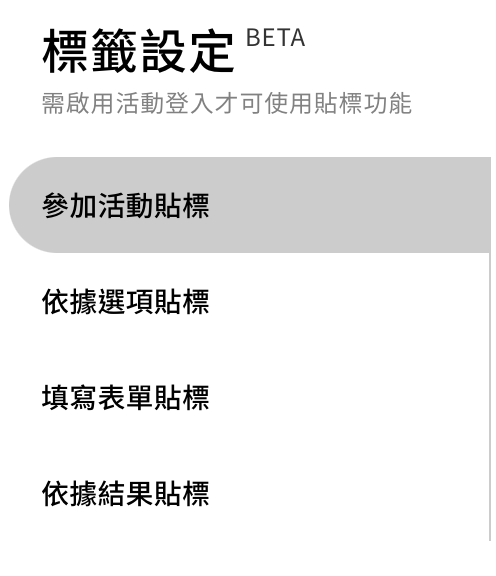
What types of promo tags are there?
Tagged automatically on completion
Everyone who takes part in the promo is automatically tagged, making it easy to identify which customers are interested in that topic.
For example:
1. Chen Yi-Jun joins a new-product sampling promo and is tagged [New Product].
2. Chen Yi-Jun completes an Expecting Mums quiz and is tagged [Expecting Mum], with a tag duration of 10 months.

Tags based on each participant’s answer choices
People who take part in a quiz or survey promo are automatically tagged based on their answer to each question, making it easy to identify which category a customer falls into.
For example:
A beauty brand runs a skincare quiz asking about customers’ biggest skin concerns.
- The first respondent selects seasonal dryness and itching, and is tagged [Sensitive Skin].
- The second respondent selects makeup fading by afternoon, and is tagged [Oily Skin].

Tags based on each participant’s quiz result
People who take a quiz or Personality Quiz promo are automatically tagged based on their result, making it easy to identify a customer’s level or type.
For example:
Chen Yi-Jun takes a dog-behavior quiz from a pet brand.
The result shows her dog likes staying home, so she’s tagged [Indoor Dog].
The result also shows her dog loves eating, so she’s tagged [Foodie].

Tags based on registration and winner form fields
People who fill out a promo form are automatically tagged based on their multiple-choice answers.
For example:
A beauty brand offers a free in-store styling session and uses a promo form to collect registrations.
- A respondent selects the Taichung Sogo session and is tagged both [Taichung] and [Sogo].
- Another respondent selects the eye makeup option and is tagged both [Eyes] and [Makeup].

Tags based on items registered on receipts
People who enter a receipt are automatically tagged based on its items, making it easy to analyze customer preferences and help brands market to different types of consumers.
For example:
A seasoning manufacturer runs a Purchase Reward promo using Feversocial’s Purchase Reward module to collect receipts from retail customers who bought its products.
- Receipts that include braised snack packs are tagged [Flavor – Braised].
- Receipts that include spices or cooking packs are tagged both [Flavor – Spicy] and [Braised Snack Pack].

How can you put promo tags to work?
Sync tag data to your CRM in real time
Integrate promo tags with your chatbot and CDP to build a more complete customer picture.

*Currently integrated with MAAC for tag sync—other systems can be integrated too, just get in touch.
Download tag data
Build audience segments from your promo tags and upload them to your sending platform for retargeting.

Ready to expand your customer profiles with promo tagging?
